
 Server troubleshooting
Why is my Minecraft server offline?
Work through the server process, address, port, edition, DNS, firewall, and Server List Ping checks that usually explain why a Minecraft server shows offline.
A Minecraft server usually shows offline when the address players are using does not return a valid status response. The server may be stopped, the port may be wrong, Java and Bedrock may be mixed up, DNS may point to the wrong place, or a firewall may be blocking the ping.
For public listings, this matters because ServerBuddy only charts a server after it is online and responds to a valid Server List Ping. The add-server flow rejects addresses that are offline, unreachable, mistyped, blocked by firewall rules, or checked with the wrong edition.
Last reviewed: May 2026. Tested with Java TCP 25565, Bedrock UDP 19132, ServerBuddy Status Checker, and Connection Doctor.
Quick fix order: 1. Check that the server process is running. 2. Test the exact public address players use. 3. Confirm the edition: Java or Bedrock. 4. Check the port: Java TCP 25565 or Bedrock UDP 19132 unless custom. 5. Test from outside your network with ServerBuddy. 6. Fix the status response before submitting the server.
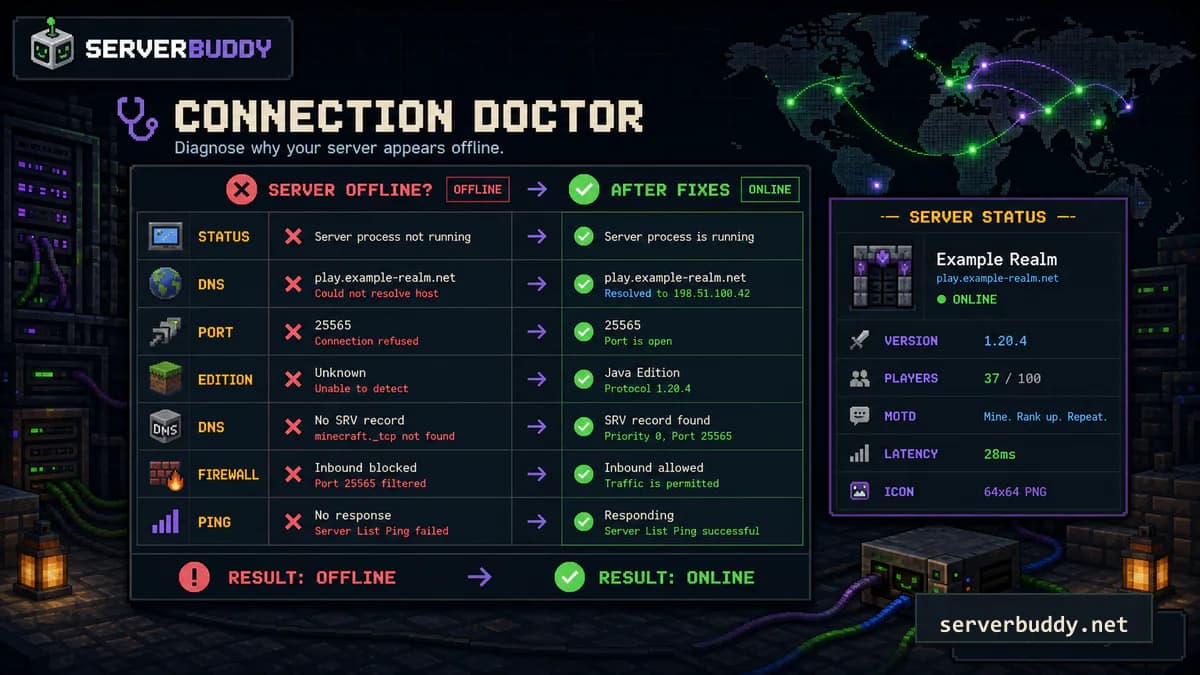
Quick diagnosis table
| What you see | Likely cause | What to check first |
|---|---|---|
| Server works on your own PC but not for friends | Port forwarding, firewall, or public IP issue | Test from outside your network |
| Server works with an IP but not a domain | DNS or SRV record issue | Check A, AAAA, and SRV records |
| Java checker fails but Bedrock works | Wrong edition or protocol | Test Java and Bedrock separately |
| Bedrock checker fails but Java works | Wrong protocol or UDP port | Check UDP 19132 or the custom Bedrock port |
| Server shows offline but players can join | Status response is disabled or blocked | Check enable-status=true and proxy settings |
| Server shows online with 0 players | The server is online but empty | This is not the same as offline |
| Players get connection timed out | Traffic is not reaching the server | Check router, host firewall, and cloud firewall |
| Players get connection refused | Something answered, but not the Minecraft server | Check the process and listening port |
Test the public address now: Use the Minecraft server status checker to see whether the server responds, which edition it uses, its version, MOTD, players, icon, and whether it is already listed. Use Connection Doctor if the problem looks like DNS, a closed port, timeout, wrong protocol, or invalid response.
Offline does not mean empty
A server with 0 players can still be online. It responded to the status check, but nobody was connected at that moment.
Offline means the check failed or the server did not respond. ServerBuddy also separates unknown from offline when there is no reliable data for a time bucket. Do not restart a server just because it has 0 players. Restart it when the process is down, the status check fails, or players cannot connect from outside your network.
Check that the server process is running
Start with the boring check first. Open your hosting panel, console, or terminal and confirm the server process is actually running.
Look for a normal startup line in the console. On most Java servers, the log eventually says the server is done loading. If the console keeps restarting, read logs/latest.log before changing random settings.
| Log or panel clue | What it usually means |
|---|---|
| Crash loop after installing a plugin | Remove the newest plugin and restart |
| Failed to bind to port | Another process is already using that port, or the bind address is wrong |
| Server stops right after launch | Check EULA, Java version, memory, and plugin errors |
| Host panel says suspended or expired | Billing, resource, or host-side issue |
| Console is online but no players can connect | Move to address, port, and firewall checks |
Check the address players are using
Use the exact address a player enters in Minecraft. Small differences matter, especially protocol prefixes, trailing paths, local IPs, and custom ports.
play.example.net
play.example.net:25566
123.45.67.89:25565https://play.example.net
play.example.net/
192.168.1.25
localhost192.168.x.x, 10.x.x.x, and localhost are local addresses. They can work on your own machine or home network, but they are not the public address most players need.
Check the port
For a normal Java server, the default port is 25565. A clean Java setup usually leaves server-ip blank, uses server-port=25565, and keeps status checks enabled. The PaperMC server.properties reference describes server-ip as the bind address and server-port as the port the server listens on.
server-ip=
server-port=25565
enable-status=true
Do not put your public IP in server-ip unless your host specifically tells you to. A wrong bind address can make the server listen on the wrong interface. Use the server.properties generator to check port and bind settings before restarting.
Bedrock is different. Java servers usually use TCP port 25565, while Bedrock servers usually use UDP port 19132. Custom ports are possible for both.
Check Java vs Bedrock
Java and Bedrock do not use the same connection protocol. If you run a Java server, test it as Java. If you run a Bedrock server, test it as Bedrock. If you use Geyser or another crossplay setup, test the Java side and Bedrock side separately because each side can fail for a different reason.
A common mistake is submitting a Bedrock server as Java, or giving players a Java address when only the Bedrock listener is reachable. ServerBuddy can auto-detect the edition, but the server still has to respond correctly when it is probed.
Check firewall and port forwarding
If the server works locally but not publicly, the problem is usually between the player and the server machine. Check the layers that can block traffic before you change Minecraft settings.
- Hosting provider firewall
- Cloud firewall or security group
- Operating system firewall
- Router port forwarding
- Server process port
- Proxy or network software
For Java, forward TCP to the Java port. For Bedrock, forward UDP to the Bedrock port. If you are not sure whether traffic is reaching the server, test the port from outside your network.
Player -> public IP/domain -> router TCP 25565 -> server computer TCP 25565 -> Minecraft serverPlayer -> public IP/domain -> router UDP 19132 -> server computer UDP 19132 -> Bedrock serverIf your server computer's local IP changed, the router may still forward traffic to the old device. Give the server machine a reserved LAN IP if you host from home.
Check DNS and SRV records
If a raw IP works but a domain does not, check DNS. For a basic setup, your domain should point to the public IP of the server or proxy. If you use a custom Java port and do not want players to type it, you may use an SRV record.
| DNS issue | What happens |
|---|---|
| A record points to old IP | Domain fails, old server responds, or timeout |
| SRV target points directly to an IP | Some DNS providers reject it or clients fail |
| SRV port is wrong | Domain resolves but connects to the wrong port |
| Proxy domain works but backend IP is private | Public players cannot reach the backend |
| Recent DNS change has not propagated | Some players can connect, others cannot |
When troubleshooting, test both the domain and the raw public IP. If the IP works and the domain fails, fix DNS before changing Minecraft settings.
Check Server List Ping
Many server lists and status tools rely on Minecraft's status response, often called Server List Ping. The wiki.vg Server List Ping reference documents the Java status response fields used for version, players, description, and favicon data.
On Paper-based Java servers, set `enable-status=true`. PaperMC documents enable-status as the setting that lets the server appear on the server list and enables the server information listener.
enable-status=trueThen restart the server. If you run a proxy, also check the proxy config. Some networks block or customize ping responses at the proxy layer, not the backend server.
Test from outside your network
Do not rely only on your own Minecraft client. Home networks can hide problems because local connections take a different route than public player connections.
Use the Minecraft server status checker with the public address players use. It resolves DNS and SRV records, auto-detects Java or Bedrock, and shows latency, version, protocol, players, MOTD, icon, and whether the server is already listed.
Use Connection Doctor when the problem looks like a port or network issue. It runs a live Minecraft status probe from ServerBuddy infrastructure, then gives a clearer failure category such as DNS failure, timeout, closed port, wrong protocol, or invalid response.
How to know it worked
You have likely fixed the issue when the public address resolves correctly, the right Java or Bedrock protocol responds, the status check returns version, player count, MOTD, and latency, players outside your network can connect, and ServerBuddy can verify the server in the Add Server flow.
Fix the issue before listing the server
Before you submit a server to a public list, make sure the public status response works. ServerBuddy creates a public profile after a successful live ping, then tracks player count, MOTD, version, uptime, activity history, and peak times over time.
| Item | Good state | Tool or guide |
|---|---|---|
| Public address | Domain or public IP, not a local IP | Minecraft server status checker |
| Edition | Java, Bedrock, or auto-detect verified | Status checker |
| Port | Correct TCP or UDP port open | Connection Doctor |
| Status response | Server responds to Server List Ping | Status checker |
| MOTD | Short, readable, and accurate | MOTD generator |
| Icon | 64x64 PNG is visible | Minecraft server icon size guide |
| Access | Whitelist or public access matches your launch plan | how to whitelist a Minecraft server |
| Listing | Server is ready to submit | Add Server |
When the checks pass, add your Minecraft server so ServerBuddy can verify it and start tracking the public profile.
FAQ
Why does my Minecraft server say offline when players can join?
On Java, the server may allow joins while hiding or blocking the status response. Check enable-status=true, proxy ping settings, firewall rules, and plugins that modify server list behavior.
What port should a Minecraft server use?
Java servers usually use TCP 25565. Bedrock servers usually use UDP 19132. Hosts can use custom ports, so always check the port in your host panel or server.properties.
Should I put my public IP in server.properties?
For most Java servers, no. Leave server-ip blank unless your host tells you to bind to a specific address.
Why can I join locally but my friends cannot?
Your server process is probably running, but public traffic is not reaching it. Check router port forwarding, firewall rules, public IP, and whether you are testing the right protocol.
Why was my server rejected by ServerBuddy?
ServerBuddy rejects a submission when it cannot verify the address. Common causes are an offline or unreachable server, mistyped address or port, firewall-blocked Server List Ping, or wrong edition selection.
Is 0 players the same as offline?
No. 0 players means the server responded and is empty. Offline means the status check failed or the server did not respond.
What does connection timed out mean on a Minecraft server?
Connection timed out usually means the client could not reach a Minecraft response before the timeout. Check the public IP, port forwarding, host firewall, cloud firewall, and whether the server is listening on the expected protocol.
What does connection refused mean on a Minecraft server?
Connection refused usually means the address responded but nothing accepted the Minecraft connection on that port. Check whether the process is running and whether the configured port matches the public port.
How do I check if port 25565 is open?
Use Connection Doctor from outside your network, then confirm the router, cloud firewall, operating system firewall, and Java server are all using TCP 25565 unless you chose a custom port.
Why does my Bedrock server show offline?
Bedrock status uses UDP, usually port 19132. A Bedrock server can look offline when only TCP is forwarded, the wrong edition is tested, or a proxy is handling Bedrock traffic separately.
Why does my Java server work locally but not publicly?
Local joins can bypass the public route. If Java works locally but not publicly, check TCP port forwarding, host firewalls, the public IP, and whether server-ip is blank or set correctly for your host.
Can DNS make a Minecraft server look offline?
Yes. A stale A record, wrong AAAA record, incorrect SRV target, or recently changed DNS can send players and status checks to the wrong place.