
 Server troubleshooting
Minecraft connection timed out: causes and fixes for server owners
A Minecraft connection timed out error usually means the client never got a public Minecraft response. Work through address, port, protocol, firewall, DNS, and Server List Ping checks before listing the server.
A Minecraft connection timed out error usually means the player's client did not get a Minecraft response before it gave up. For server owners, the most common causes are a wrong public address, closed port, blocked firewall rule, wrong Java or Bedrock protocol, stale DNS record, or a server process that is running locally but not reachable from the public internet.
Last reviewed: June 2026. Tested with Java TCP 25565, Bedrock UDP 19132, ServerBuddy Status Checker, and Connection Doctor.
Start with the same public address players type into Minecraft. Test it with the Minecraft server status checker, then run Connection Doctor if the result looks like a timeout, closed port, wrong protocol, DNS failure, or invalid response.
Quick fix order
- Test the exact public address with the Minecraft server status checker.
- Run Connection Doctor for the same host, port, and edition.
- Confirm the server is using the right port.
- Check Java vs Bedrock.
- Check router, host, and cloud firewall rules.
- Check DNS or SRV records.
- Test again from outside your network.
- Only submit the server after the public status check works.
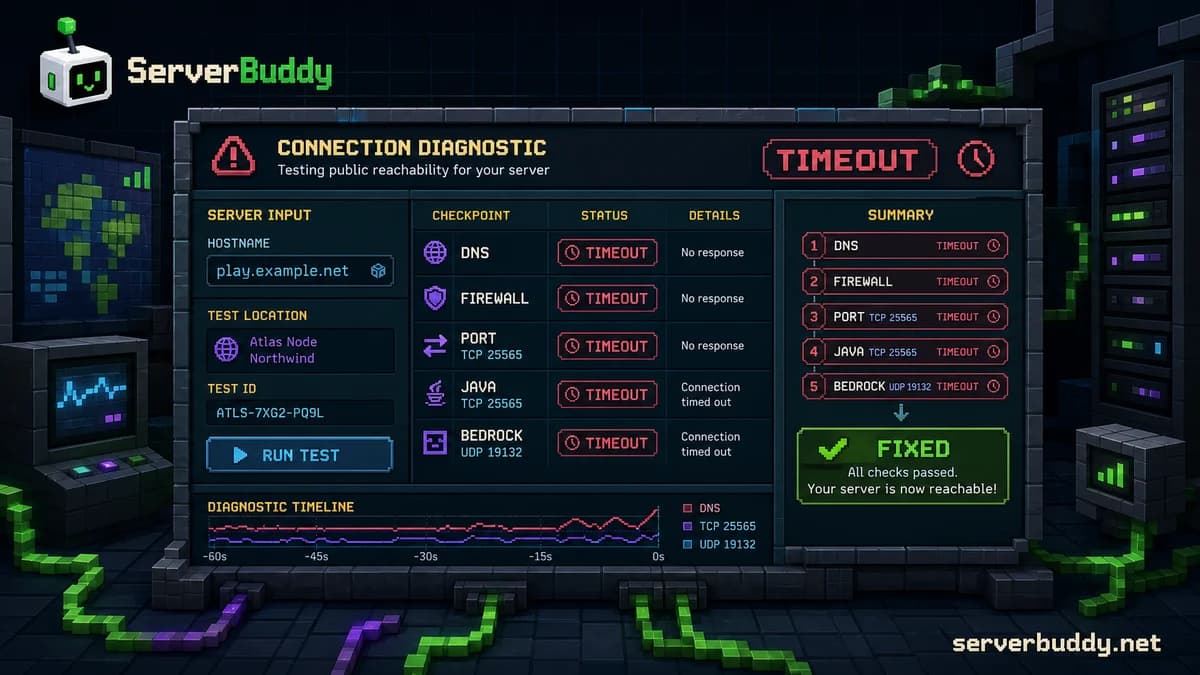
What connection timed out means in Minecraft
Connection timed out means Minecraft waited for a response and did not get one in time. That is different from connection refused, where something answered but did not accept the connection, and different from unknown host, where the domain did not resolve.
For Java servers, the default public connection port is usually TCP 25565. Paper's server.properties reference lists server-port=25565 as the port the server listens on, and says server-ip should be left blank to bind to all interfaces unless your host says otherwise. See the PaperMC server.properties reference for the setting details.
For Bedrock servers, the default is usually UDP 19132. Bedrock uses RakNet over UDP, and the Bedrock Wiki documents 19132 as the default IPv4 RakNet port for Bedrock servers in its RakNet protocol reference.
A timeout often means traffic is being dropped before it reaches the Minecraft listener. That can happen at the router, a cloud firewall, the operating system firewall, a host panel firewall, a proxy, or DNS pointing players to the wrong place.
Quick diagnosis table
| What players see | Likely cause | What to check first |
|---|---|---|
| Connection timed out: no further information | Traffic is not reaching a Minecraft response | Run Connection Doctor against the public host and port |
| Connection timed out: getsockopt | Often the same public reachability problem, especially on Java | Check TCP 25565 or the custom Java port |
| Connection timed out after 30000 ms | The client waited and gave up | Check firewall, port forwarding, and public address |
| Works for you, times out for friends | Local access works, public access fails | Test from outside your network |
| Works by IP, fails by domain | DNS or SRV problem | Check A, AAAA, and SRV records |
| Java works, Bedrock times out | UDP is blocked or Bedrock listener is wrong | Check UDP 19132 or the custom Bedrock port |
| Bedrock works, Java times out | TCP is blocked or Java listener is wrong | Check TCP 25565 or the custom Java port |
| Only one player times out | Player-side network or route issue | Test from another network before changing server config |
| Status checker works, joining fails | Login-stage issue, not basic reachability | Check whitelist, version, proxy, resource pack, auth, and logs |
| Connection refused | Something answered, but not the expected Minecraft service | Check server process and listening port |
| Unknown host | Domain resolution failed | Fix DNS before changing Minecraft settings |
Test the public address first
Start with the exact address players type into Minecraft. Do not test a different host, an old domain, a local IP, or a panel-only address.
play.example.net
play.example.net:25566
123.45.67.89:25565https://play.example.net
play.example.net/
localhost
192.168.1.25
10.0.0.12localhost, 192.168.x.x, and 10.x.x.x can work on the owner's computer or home network, but they are not public addresses. A player outside your network needs the public domain or public IP.
ServerBuddy's status checker resolves DNS and Java SRV records, auto-detects Java or Bedrock, and shows latency, version, protocol, players, MOTD, and icon when the server responds.
Check the server process and listening port
A timeout can happen even when your hosting panel says the server is online. The panel may only mean the process started. It does not prove that players can reach the public listener.
For Java servers, check server.properties and keep the status response enabled unless your host has a specific reason to change it.
server-ip=
server-port=25565
enable-status=true
For most Java servers, leave server-ip blank. Setting it to the wrong value can make the server bind to the wrong interface. If you changed the port, players must include the port, for example play.example.net:25566.
ss -tulpn | grep 25565Get-NetTCPConnection -LocalPort 25565For Bedrock, check UDP instead of TCP. A common mistake is opening TCP 19132 while the Bedrock server is listening on UDP 19132.
Check Java vs Bedrock before changing settings
Java and Bedrock do not use the same network path. Testing a Bedrock server as Java can fail even when the Bedrock server is online. Testing a Java server as Bedrock can fail for the same reason.
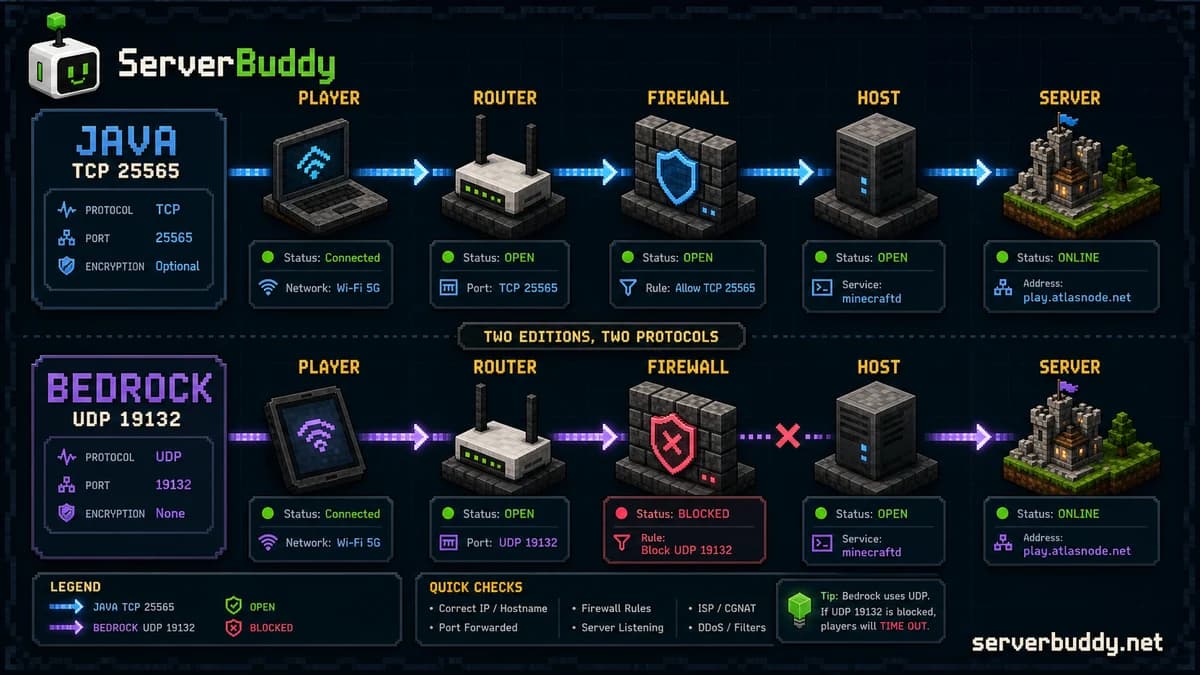
| Server type | Default port | Transport | Common timeout cause |
|---|---|---|---|
| Java | 25565 | TCP | TCP not forwarded or firewall blocks the port |
| Bedrock | 19132 | UDP | UDP not forwarded, or only TCP was opened |
| Java custom port | Custom | TCP | Players forgot :port, or SRV points to the wrong port |
| Bedrock custom port | Custom | UDP | Players use the wrong port, or host firewall blocks UDP |
| Geyser or crossplay proxy | Depends on setup | TCP and UDP | Java side works but Bedrock side is not exposed |
Bedrock's status path uses unconnected RakNet pings and pongs over UDP. The Bedrock Wiki describes the unconnected pong as the response that can include MOTD, protocol version, version name, player count, max player count, game mode, and ports.
If you run Geyser, Velocity, BungeeCord, Waterfall, or another proxy, test the public proxy address, not just the backend server. The backend can be healthy while the public proxy is the part timing out.
Check firewall and port forwarding
If the server works locally but players time out, the problem is usually in the public route. For home-hosted Java, traffic normally needs to reach router TCP 25565, then the server computer TCP 25565, then the Minecraft server. For Bedrock, the same path usually needs UDP 19132.
- Router port forwarding
- Server computer's local IP address
- Operating system firewall
- Antivirus or security software firewall
- Cloud firewall or security group
- Hosting provider firewall
- Proxy firewall
- Minecraft server port
Do not forward to a changing local IP. If your server computer was 192.168.1.25 yesterday and is 192.168.1.31 today, your router may still forward traffic to the old device. Reserve a LAN IP for the server machine.
For Java, forward TCP. For Bedrock, forward UDP. If you run both, you may need both, but only when both server listeners actually exist.
Check DNS and SRV records
DNS can cause a timeout when the domain points to the wrong IP or when an SRV record sends Java clients to the wrong host or port. Test both the domain and the raw public IP before changing Minecraft settings.
play.example.net
123.45.67.89:25565| DNS issue | What happens |
|---|---|
| A record points to an old IP | Players connect to the wrong server or time out |
| AAAA record points to a broken IPv6 target | Some players fail while others connect |
| SRV port is wrong | Domain resolves but connects to the wrong port |
| SRV target points directly to an IP | Some DNS providers or clients may fail |
| Proxy domain points to backend private IP | Public players cannot reach the backend |
| Recent DNS change has not propagated | Some players connect, others time out |
For a Java server on a custom port, an SRV record can let players use play.example.net without typing :25566. The SRV target and port still need to match the public listener.
Check Server List Ping
A Minecraft server can be reachable for joins but still fail a status check. That matters for public server lists and status tools. Java servers use Server List Ping for the multiplayer list, and the wiki.vg Server List Ping reference says it can query MOTD, player count, max players, and server version through the server's usual port.
On Paper-based Java servers, keep enable-status=true unless you intentionally want to hide status data. If it is off, a server can appear offline to status tools even when direct joins still work.
If you use a proxy, check the proxy status response too. Server lists usually see the public proxy, not the backend server hidden behind it.
Check whether the problem is server-side or player-side
Do not rebuild your server config because one player timed out. First prove whether the server is reachable from outside.
| Signal | What it suggests |
|---|---|
| ServerBuddy cannot reach the public address | The server-side public route is probably broken |
| Multiple players on different networks time out | The server-side public route is probably broken |
| The raw IP and domain both fail | Firewall, listener, or public route issue |
| ServerBuddy sees the server online | Basic public status is working |
| Only one home network fails | Player-side route, VPN, DNS, or firewall issue |
| The player can join through a mobile hotspot | Player-side network is likely the problem |
For player-side checks, ask the player to try another network, restart the game, restart the router, disable VPN temporarily, check firewall rules, and test without heavy downloads running. Server owners should keep the public status result as the source of truth.
Check the logs before guessing
When a player times out, check whether the server saw the connection attempt. If the server log shows nothing, the request probably never reached Minecraft. Focus on DNS, firewall, port forwarding, cloud firewall, or wrong protocol.
If the server log shows a partial login, the network path may be working and the issue may be later in the join process. Look for version mismatch, whitelist rejection, plugin error, proxy forwarding error, resource pack prompt, authentication issue, or mod mismatch.
logs/latest.log
crash-reports/
proxy logs
hosting panel console
firewall logs
router port-forward page
How to know the timeout is fixed
- ServerBuddy's status checker returns online state, version, players, MOTD, and latency.
- Connection Doctor no longer reports timeout, closed port, DNS failure, or wrong protocol.
- A player outside your network can connect with the same address.
- Java or Bedrock edition is verified.
- The correct TCP or UDP port is open.
- The domain and raw IP behave as expected.
- The server logs show normal joins.
- The server can pass the Add Server live ping.
Before listing a public server, run one final status check. ServerBuddy's Add Server page validates that a server is online and responds to a valid Minecraft status check before creating a public profile with live player count, MOTD, version, uptime, and activity history.
What to do before listing the server
| Item | Good state | Tool |
|---|---|---|
| Public address | Domain or public IP, not a local IP | Status checker |
| Edition | Java, Bedrock, or crossplay path verified | Status checker |
| Java port | TCP 25565 or custom TCP port open | Connection Doctor |
| Bedrock port | UDP 19132 or custom UDP port open | Connection Doctor |
| DNS | A, AAAA, and SRV records point to the right target | DNS provider |
| Status response | Server returns MOTD, version, and players | Status checker |
| server.properties | Port and status settings are correct | server.properties generator |
| Listing | Server passes live validation | Add your Minecraft server |
When those checks pass, add your Minecraft server. If they fail, fix the public reachability problem first.
FAQ
What does connection timed out mean in Minecraft?
It means the Minecraft client did not get a response from the server before the timeout ended. For a server owner, that usually points to a public reachability problem such as a wrong address, blocked port, firewall rule, wrong protocol, or DNS issue.
How do I fix minecraft connection timed out getsockopt?
Treat getsockopt as a network reachability clue. Test the public host and port with Connection Doctor, then check whether Java TCP 25565 or your custom Java TCP port is open. If you are running Bedrock, check UDP 19132 or your custom Bedrock UDP port instead.
Is connection timed out the same as connection refused?
No. Connection timed out usually means the request did not receive a response in time. Connection refused usually means something answered at the address, but no service accepted the connection on that port.
Why can I join my server but my friends get timed out?
You may be joining through a local route while your friends use the public route. Check the public IP or domain, router port forwarding, operating system firewall, cloud firewall, and the correct Java or Bedrock protocol.
What port should I open for a Minecraft server?
For Java, open TCP 25565 unless you changed the port. For Bedrock, open UDP 19132 unless you changed the port. Crossplay setups may need both a Java-side and Bedrock-side listener.
Should I forward both TCP and UDP?
Forward TCP for Java and UDP for Bedrock unless your server software, proxy, or host says otherwise. Opening both is not a fix by itself if the server is only listening on one protocol.
Can DNS cause connection timed out?
Yes. A stale A record, wrong AAAA record, broken SRV record, or domain pointing to a private backend can send players to the wrong place. Test both the domain and the raw public IP.
Why does the status checker show offline when players can join?
On Java, the server or proxy may be blocking or disabling the status response. Check enable-status=true and proxy ping settings. A public server list needs the status response even when direct joins still work.
Can whitelist cause a timeout?
Usually no. A whitelist normally rejects the player after the server is reached. If the player sees a real timeout and the server log shows no connection attempt, check the network path first.
Should I put my public IP in server.properties?
Usually no. For most Java servers, leave server-ip blank unless your hosting provider tells you to bind to a specific address. A wrong bind address can stop the server from listening on the interface players need.
Why does Bedrock time out when Java works?
Bedrock uses UDP, usually port 19132. Java uses TCP, usually port 25565. If you only forwarded TCP, Java may work while Bedrock fails.
How do I check if port 25565 is open?
Use Connection Doctor with your public host, Java TCP, and port 25565 or your custom Java port. Then confirm the router, cloud firewall, operating system firewall, and server process all point to the same port.